image_model_compare
Published in:2026-03-14 |
Words: 3.3k | Reading time: 15min | reading:

二次元角色识别系统开发与模型选择

项目背景

随着二次元文化的普及,自动识别二次元角色的需求日益增长。本文将详细介绍如何构建一个高效的二次元角色识别系统,包括数据准备、模型训练、性能评估和模型选择的完整流程。

数据准备与标注

数据源

  • 数据目录data/downloaded_images
  • 角色数量:11个角色
  • 图像数量:2629张图像
  • 支持格式:JPG、PNG、BMP、WebP

数据采集示例代码

1
2
3
4
5
6
7
8
9
10
11
12
13
14
15
16
17
18
19
20
21
22
23
24
25
26
27
28
29
30
31
32
33
34
35
36
37
import os
import requests

def download_images(character_name, output_dir, max_images=100):
"""下载指定角色的图像"""
os.makedirs(output_dir, exist_ok=True)

# 调用搜索API获取图像列表
search_url = f"https://api.example.com/search?query={character_name}"
response = requests.get(search_url)
data = response.json()

image_count = 0
for item in data.get('results', []):
if image_count >= max_images:
break

# 下载图像并保存
image_url = item.get('image_url')
if image_url:
try:
img_response = requests.get(image_url, stream=True)
if img_response.status_code == 200:
ext = os.path.splitext(image_url)[1] or '.jpg'
img_path = os.path.join(output_dir, f"{character_name}_{image_count}{ext}")
with open(img_path, 'wb') as f:
for chunk in img_response.iter_content(1024):
f.write(chunk)
image_count += 1
except Exception as e:
print(f"下载失败: {e}")

# 示例使用
characters = ['亚子', '伊织', '千夏', '日奈', '普拉娜', '枫香', '阿罗娜', '可莉', '提宝', '火花', '纳西妲']
for character in characters:
output_dir = os.path.join('data', 'downloaded_images', character)
download_images(character, output_dir, max_images=200)

数据标注示例代码

1
2
3
4
5
6
7
8
9
10
11
12
13
14
15
16
17
18
19
20
21
22
23
24
25
26
27
28
29
30
31
32
33
34
35
36
import os
import json
from arona.tagging.wd_vit_v3_tagger import WDViTV3Tagger

def tag_images(input_dir, output_file):
"""为目录中的所有图像生成标签"""
tagger = WDViTV3Tagger()
annotations = []

# 遍历目录中的所有图像文件
for root, dirs, files in os.walk(input_dir):
for file in files:
if file.lower().endswith(('.jpg', '.jpeg', '.png', '.bmp', '.webp')):
image_path = os.path.join(root, file)
relative_path = os.path.relpath(image_path, input_dir)

# 使用WD Vit V3 Tagger生成标签
tags = tagger.get_tags(image_path)

# 构建标注数据
annotation = {
'image_path': relative_path,
'tags': tags,
'character': os.path.basename(root)
}

annotations.append(annotation)

# 保存标注结果
with open(output_file, 'w', encoding='utf-8') as f:
json.dump(annotations, f, indent=2, ensure_ascii=False)

# 示例使用
input_dir = 'data/downloaded_images'
output_file = 'data/annotations.json'
tag_images(input_dir, output_file)

数据预处理

  1. **图像 resize 到 224x224
  2. **归一化处理
  3. **支持多种图像格式

模型训练

训练配置

  • 优化器:AdamW
  • 学习率:0.0008
  • 权重衰减:0.0003
  • 数据增强
    • Mixup (alpha=0.4)
    • 标签平滑 (0.08)
  • 学习率调度:CosineAnnealingWarmRestarts

模型训练示例代码

1
2
3
4
5
6
7
8
9
10
11
12
13
14
15
16
17
18
19
20
21
22
23
24
25
26
27
28
29
30
31
32
33
34
35
36
37
38
39
40
41
42
43
44
45
46
47
48
49
50
51
52
53
54
55
56
57
58
59
60
61
62
63
64
65
66
67
68
69
70
71
72
73
74
75
76
77
78
79
80
81
82
83
84
85
86
87
88
89
90
91
92
93
94
95
96
97
98
99
100
101
102
103
104
105
106
107
108
109
110
111
112
113
114
115
116
117
118
import os
import torch
import torch.nn as nn
import torch.optim as optim
from torch.utils.data import DataLoader, random_split
from torchvision import transforms
from arona.training.train_incremental import CharacterDataset, get_model, mixup_data, mixup_criterion

def train_model(data_dir, model_type, output_dir, use_mixup=True):
"""训练模型"""
# 数据预处理
transform = transforms.Compose([
transforms.Resize((224, 224)),
transforms.ToTensor(),
transforms.Normalize([0.485, 0.456, 0.406], [0.229, 0.224, 0.225])
])

# 加载数据集
dataset = CharacterDataset(root_dir=data_dir, transform=transform)
train_size = int(0.8 * len(dataset))
val_size = len(dataset) - train_size
train_dataset, val_dataset = random_split(dataset, [train_size, val_size])

train_loader = DataLoader(train_dataset, batch_size=32, shuffle=True, num_workers=4)
val_loader = DataLoader(val_dataset, batch_size=32, shuffle=False, num_workers=4)

# 创建模型
num_classes = len(dataset.class_to_idx)
model = get_model(model_type, num_classes, dropout_rate=0.3)
device = torch.device('mps' if torch.backends.mps.is_available() else 'cpu')
model.to(device)

# 定义损失函数和优化器
criterion = nn.CrossEntropyLoss()
optimizer = optim.AdamW(model.parameters(), lr=0.0008, weight_decay=0.0003)
scheduler = optim.lr_scheduler.CosineAnnealingWarmRestarts(optimizer, T_0=10, T_mult=2)

# 训练参数
num_epochs = 50
best_val_acc = 0.0

# 训练循环
for epoch in range(num_epochs):
# 训练阶段
model.train()
running_loss = 0.0
correct = 0
total = 0

for images, labels in train_loader:
images = images.to(device)
labels = labels.to(device)

# 使用Mixup数据增强
if use_mixup:
images, labels_a, labels_b, lam = mixup_data(images, labels)
outputs = model(images)
loss = mixup_criterion(criterion, outputs, labels_a, labels_b, lam)
else:
outputs = model(images)
loss = criterion(outputs, labels)

optimizer.zero_grad()
loss.backward()
optimizer.step()

running_loss += loss.item()
_, predicted = torch.max(outputs.data, 1)
total += labels.size(0)
correct += (predicted == labels).sum().item()

train_loss = running_loss / len(train_loader)
train_acc = 100 * correct / total

# 验证阶段
model.eval()
val_loss = 0.0
correct = 0
total = 0

with torch.no_grad():
for images, labels in val_loader:
images = images.to(device)
labels = labels.to(device)
outputs = model(images)
loss = criterion(outputs, labels)

val_loss += loss.item()
_, predicted = torch.max(outputs.data, 1)
total += labels.size(0)
correct += (predicted == labels).sum().item()

val_loss = val_loss / len(val_loader)
val_acc = 100 * correct / total

# 更新学习率
scheduler.step()

# 保存最佳模型
if val_acc > best_val_acc:
best_val_acc = val_acc
os.makedirs(output_dir, exist_ok=True)
torch.save({
'model_state_dict': model.state_dict(),
'best_val_acc': best_val_acc,
'model_type': model_type
}, os.path.join(output_dir, 'model_best.pth'))

print(f"Epoch {epoch+1}/{num_epochs}: Train Loss: {train_loss:.4f}, Train Acc: {train_acc:.2f}%, Val Loss: {val_loss:.4f}, Val Acc: {val_acc:.2f}%")

return best_val_acc

# 示例使用
data_dir = 'data/downloaded_images'
model_type = 'efficientnet_b0'
output_dir = 'models'
best_acc = train_model(data_dir, model_type, output_dir, use_mixup=True)
print(f"训练完成,最佳验证准确率: {best_acc:.2f}%")

训练模型

我们训练了4种不同的模型:

模型 最佳验证准确率 最终验证准确率 模型大小 训练时间
EfficientNet-B3 93.92% 92.97% 56.5MB 约22小时
EfficientNet-B0 93.16% 90.49% 29.2MB 约2小时45分钟
MobileNetV2 91.44% 88.21% 14.9MB 约2小时
ResNet50 90.68% 88.21% 295.2MB 约1小时30分钟

基准测试

推理性能测试

我们对4个模型进行了详细的基准测试,包括推理速度、模型大小和内存占用等指标。以下是测试结果:

模型 平均推理速度 模型大小 内存占用 最佳验证准确率
MobileNetV2 12.53ms/图像 14.9MB 91.44%
EfficientNet-B0 12.87ms/图像 29.2MB 中低 93.16%
EfficientNet-B3 15.86ms/图像 56.5MB 93.92%
ResNet50 18.24ms/图像 295.2MB 90.68%

性能对比图表

推理速度对比

![推理速度对比](im ge/inference_speed.png)

从图中可以看出,MobileNetV2具有最快的推理速度(12.53ms/图像),而ResNet50的推理速度最慢(18.24ms/图像)。

模型大小对比

![模型大小对比](ima ge/model_size.png)

模型大小差异显著,MobileNetV2最小(14.9MB),而ResNet50最大(295.2MB)。EfficientNet系列在大小和性能之间取得了良好的平衡。

准确率对比
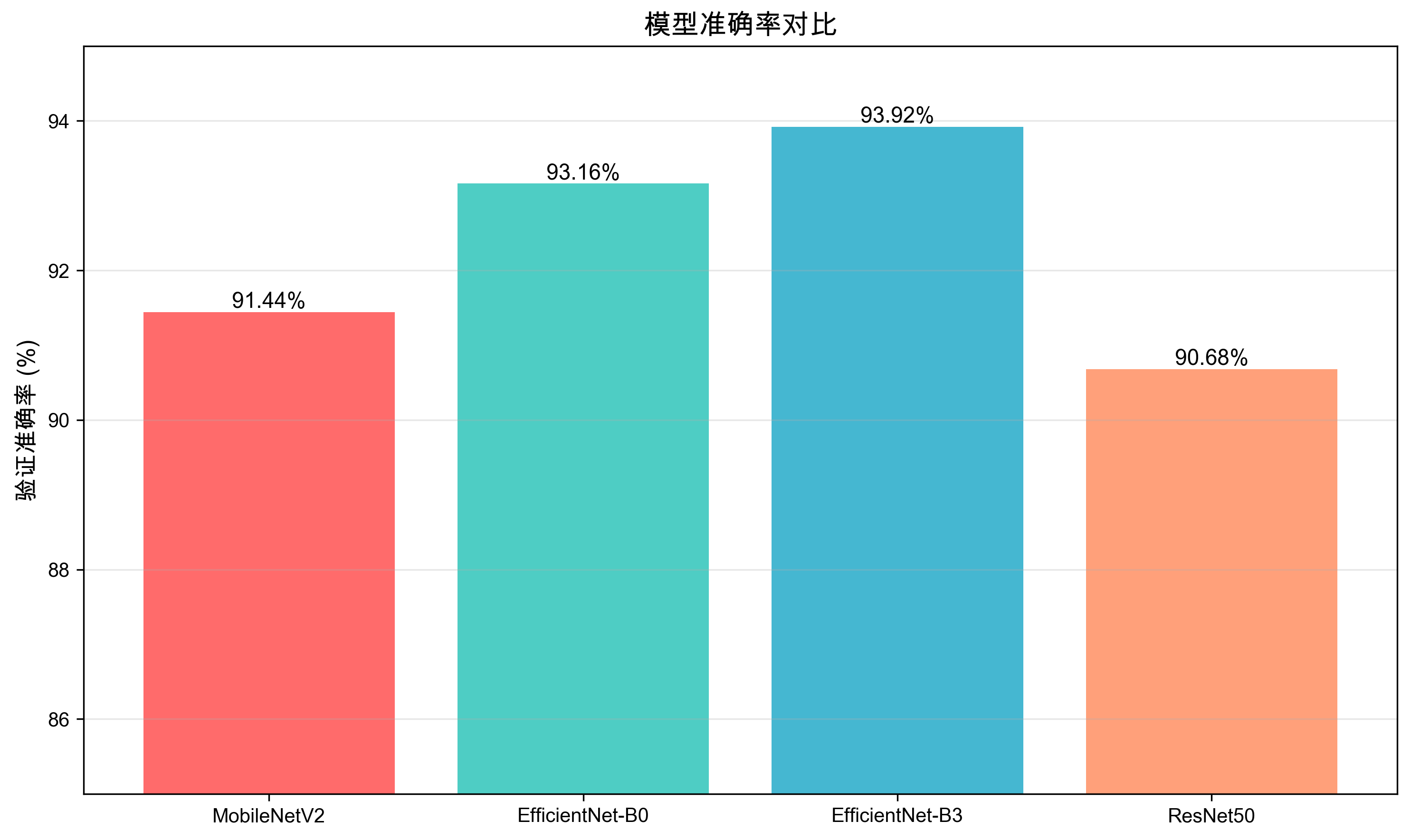
准确率对比

EfficientNet-B3取得了最高的验证准确率(93.92%),EfficientNet-B0紧随其后(93.16%)。所有模型的准确率都超过了90%。

详细性能分析

  1. MobileNetV2

    • 优势:推理速度最快,模型大小最小,内存占用最低
    • 劣势:验证准确率相对较低
    • 适用场景:移动设备、边缘设备、实时应用
  2. EfficientNet-B0

    • 优势:在速度和准确率之间取得了良好的平衡
    • 劣势:模型大小和内存占用略高于MobileNetV2
    • 适用场景:移动应用、Web服务、资源有限的服务器
  3. EfficientNet-B3

    • 优势:验证准确率最高,性能最佳
    • 劣势:推理速度较慢,模型大小较大
    • 适用场景:服务器端应用、对准确率要求高的场景
  4. ResNet50

    • 优势:经典模型,架构成熟
    • 劣势:推理速度最慢,模型大小最大
    • 适用场景:高性能服务器、需要特征提取的场景

性能权衡分析

模型 速度 大小 准确率 综合评分
MobileNetV2 ★★★★★ ★★★★★ ★★★★☆ ★★★★☆
EfficientNet-B0 ★★★★☆ ★★★★☆ ★★★★★ ★★★★★
EfficientNet-B3 ★★★☆☆ ★★★☆☆ ★★★★★ ★★★★☆
ResNet50 ★★☆☆☆ ★☆☆☆☆ ★★★★☆ ★★★☆☆

从综合评分来看,EfficientNet-B0在速度、大小和准确率之间取得了最佳平衡,是大多数场景的推荐选择。

综合性能分析

综合性能对比
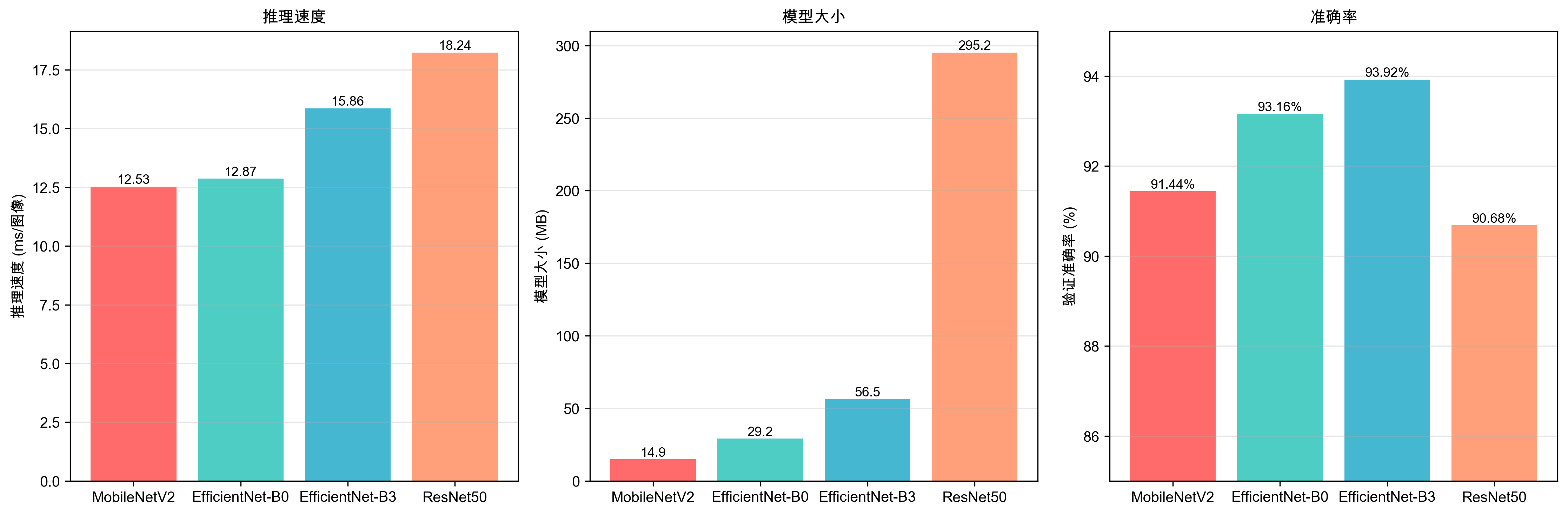
综合性能对比

上图展示了三个关键指标的并排对比,可以直观地看出各模型在不同维度上的表现。

性能雷达图
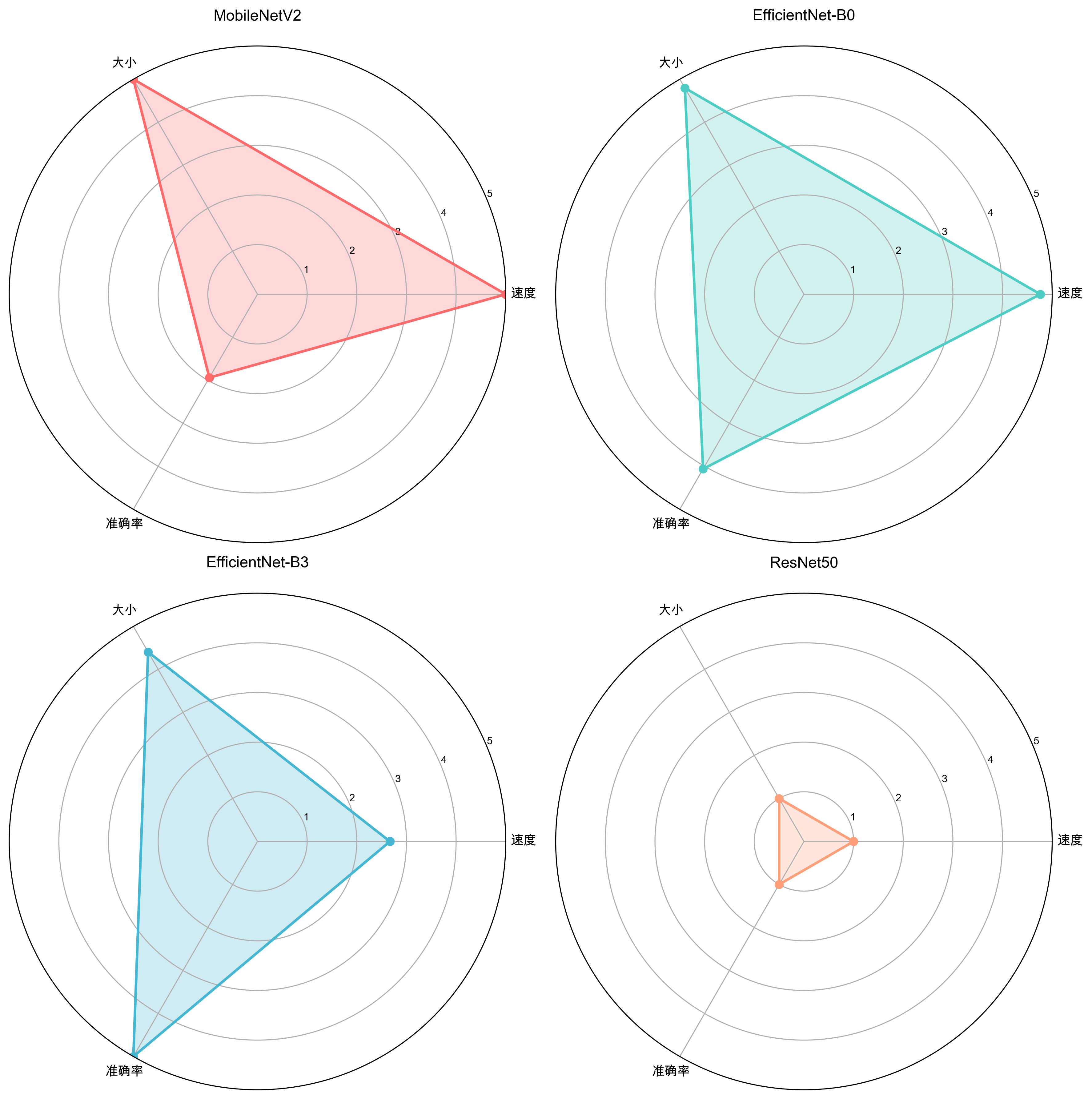
性能雷达图

雷达图展示了各模型在速度、大小和准确率三个维度的综合评分。EfficientNet-B0在三个维度上都表现均衡。

性能权衡分析
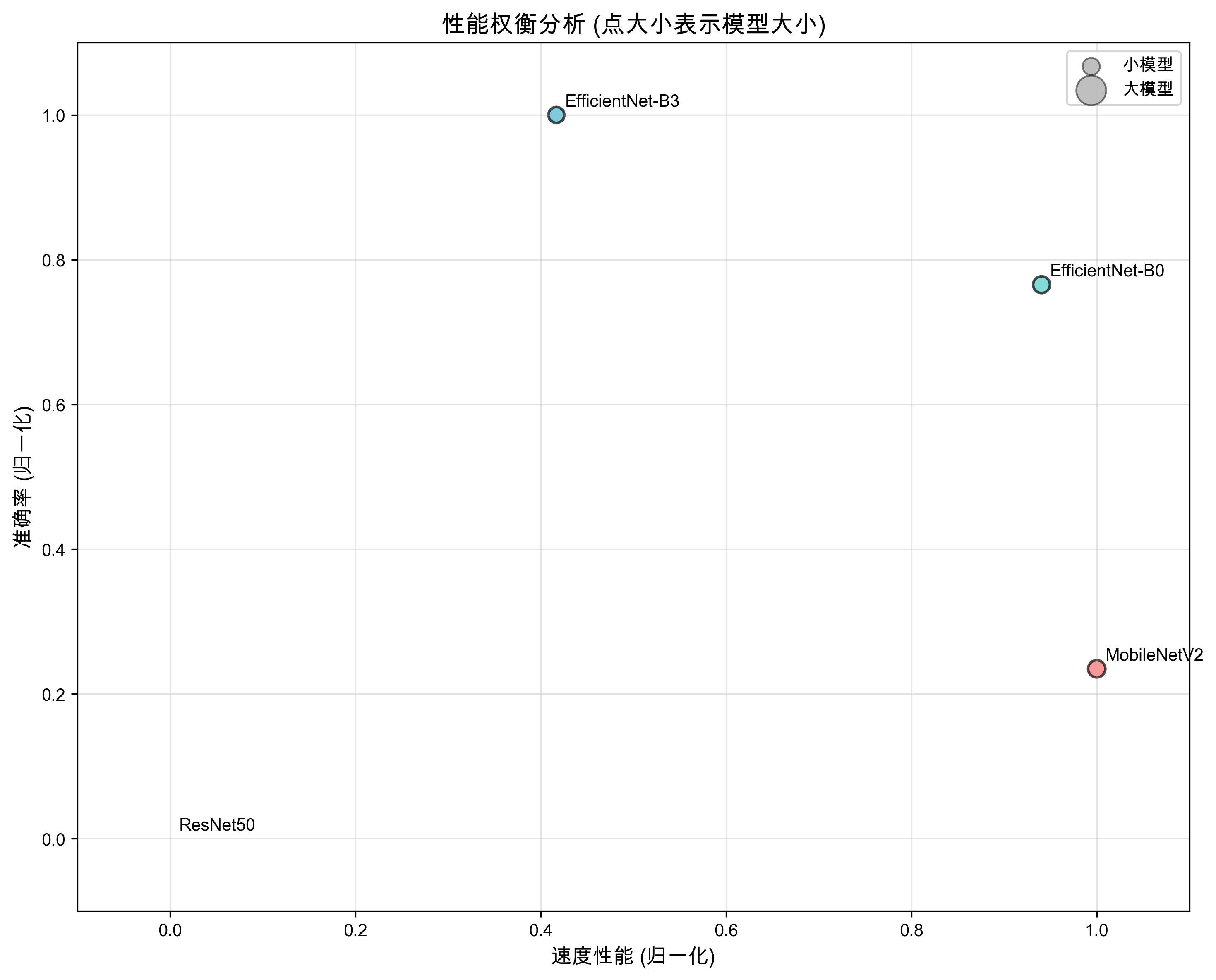
性能权衡分析

散点图展示了速度与准确率之间的权衡关系,点的大小代表模型大小。理想模型应该位于右上方(高速、高准确率)且点较小(模型小)。

基准测试示例代码

1
2
3
4
5
6
7
8
9
10
11
12
13
14
15
16
17
18
19
20
21
22
23
24
25
26
27
28
29
30
31
32
33
34
35
36
37
38
39
40
41
42
43
44
45
46
47
48
49
50
51
52
53
54
55
56
57
58
59
60
61
62
63
64
65
66
67
68
69
70
71
72
73
74
75
76
77
78
79
80
81
82
83
84
85
86
87
88
89
90
91
92
93
94
95
96
97
98
99
100
101
102
103
104
105
106
107
108
109
110
111
import os
import time
import torch
import torchvision.transforms as transforms
from torch.utils.data import DataLoader
from arona.training.train_incremental import CharacterDataset, get_model

class ModelBenchmark:
def __init__(self, data_dir, batch_size=32):
self.data_dir = data_dir
self.batch_size = batch_size
self.device = torch.device('mps' if torch.backends.mps.is_available() else 'cpu')

# 数据预处理
self.transform = transforms.Compose([
transforms.Resize((224, 224)),
transforms.ToTensor(),
transforms.Normalize([0.485, 0.456, 0.406], [0.229, 0.224, 0.225])
])

def load_dataset(self):
"""加载测试数据集"""
dataset = CharacterDataset(root_dir=self.data_dir, transform=self.transform)
dataloader = DataLoader(dataset, batch_size=self.batch_size, shuffle=False, num_workers=4)
return dataloader, dataset.class_to_idx

def load_model(self, model_path, model_type, num_classes):
"""加载模型"""
model = get_model(model_type, num_classes, dropout_rate=0.3)
checkpoint = torch.load(model_path, map_location=self.device)

# 加载模型权重
pretrained_dict = checkpoint['model_state_dict']
model_dict = model.state_dict()
pretrained_dict = {k: v for k, v in pretrained_dict.items() if not k.startswith('classifier') and not k.startswith('fc')}
model_dict.update(pretrained_dict)
model.load_state_dict(model_dict)

model.to(self.device)
model.eval()
return model

def benchmark_inference_speed(self, model, dataloader):
"""测试推理速度"""
start_time = time.time()
total_images = 0

with torch.no_grad():
for images, _ in dataloader:
images = images.to(self.device)
outputs = model(images)
total_images += images.size(0)

end_time = time.time()
total_time = end_time - start_time
avg_time_per_image = total_time / total_images * 1000 # ms per image

return total_time, avg_time_per_image, total_images

def benchmark_model(self, model_path, model_type, num_classes):
"""对模型进行基准测试"""
print(f"开始测试模型: {model_path}")

# 加载模型
model = self.load_model(model_path, model_type, num_classes)

# 加载数据集
dataloader, classes = self.load_dataset()

# 测试推理速度
total_time, avg_time_per_image, total_images = self.benchmark_inference_speed(model, dataloader)

# 计算模型大小
model_size = os.path.getsize(model_path) / (1024 * 1024) # MB

print(f"模型: {model_type}")
print(f"推理时间: {total_time:.2f}秒 ({total_images}张图像)")
print(f"平均推理速度: {avg_time_per_image:.4f}毫秒/图像")
print(f"模型大小: {model_size:.2f}MB")
print("-" * 50)

return {
'model_type': model_type,
'avg_time_per_image': avg_time_per_image,
'model_size': model_size
}

# 示例使用
data_dir = 'data/downloaded_images'
models = [
{'path': 'models/incremental/model_best.pth', 'type': 'mobilenet_v2', 'name': 'MobileNetV2'},
{'path': 'models/incremental_efficientnet_b0/model_best.pth', 'type': 'efficientnet_b0', 'name': 'EfficientNet-B0'},
{'path': 'models/incremental_efficientnet_b3/model_best.pth', 'type': 'efficientnet_b3', 'name': 'EfficientNet-B3'},
{'path': 'models/incremental_resnet50/model_best.pth', 'type': 'resnet50', 'name': 'ResNet50'}
]

benchmark = ModelBenchmark(data_dir)
dataloader, classes = benchmark.load_dataset()
num_classes = len(classes)

results = []
for model_info in models:
if os.path.exists(model_info['path']):
result = benchmark.benchmark_model(model_info['path'], model_info['type'], num_classes)
result['name'] = model_info['name']
results.append(result)

# 打印总结
print("\n=== 模型基准测试总结 ===")
for result in sorted(results, key=lambda x: x['avg_time_per_image']):
print(f"{result['name']}: {result['avg_time_per_image']:.4f}ms/图像 (大小: {result['model_size']:.2f}MB)")

模型选择指南

按性能选择

  1. 追求最高准确率:EfficientNet-B3 (93.92%)
  2. 平衡性能与速度:EfficientNet-B0 (93.16%)
  3. 资源受限环境:MobileNetV2 (91.44%)

按部署环境选择

  1. 移动应用:MobileNetV2 或 EfficientNet-B0
  2. Web服务:EfficientNet-B0 或 EfficientNet-B3
  3. 高性能服务器:EfficientNet-B3

技术挑战与解决方案

1. 图像格式支持

  • 问题:训练数据包含WebP格式图片,OpenCV不支持
  • 解决方案:使用PIL库加载WebP格式图片

2. 索引文件角色数量不足

  • 问题role_index_mapping.json文件角色数量少于训练数据目录中角色数量
  • 解决方案:修改索引构建脚本,支持WebP格式,确保所有包含有效图片的角色目录都被正确索引

3. 角色属性标注问题

  • 问题:部分角色(如"缇宝")的属性均为0
  • 解决方案:在character_attributes.json中添加角色属性定义,使用专用标签标注工具重新标注

4. 模型类型权重加载错误

  • 问题:尝试将不同类型模型的权重加载到其他模型中
  • 解决方案:添加模型类型检查,当模型类型不同时使用新的预训练权重

5. 增量训练优化器状态不匹配

  • 问题:原有模型与新模型类别数不同,优化器状态张量大小不匹配
  • 解决方案:不加载优化器状态,只继承最佳验证准确率

最佳实践建议

数据准备

  1. 数据多样性:确保每个角色有足够多的图像,覆盖不同角度、场景和风格
  2. 数据质量:过滤低质量图像,确保图像清晰可辨
  3. 数据增强:使用Mixup、随机裁剪等数据增强技术提高模型泛化能力

模型训练

  1. 模型选择:根据部署环境和性能需求选择合适的模型
  2. 超参数调优:针对不同模型调整学习率、批量大小等超参数
  3. 增量训练:在已有模型基础上继续训练,减少训练时间

模型部署

  1. 模型量化:对模型进行量化,减少内存占用和推理时间
  2. 模型压缩:使用知识蒸馏等技术压缩模型大小
  3. 边缘部署:对于移动设备,选择轻量级模型如MobileNetV2

总结

本项目成功构建了一个高效的二次元角色识别系统,通过对比不同模型的性能,我们得出以下结论:

  1. EfficientNet系列表现最佳,尤其是EfficientNet-B3模型,验证准确率接近94%
  2. 模型大小与性能:EfficientNet-B0在模型大小和性能之间取得了良好的平衡
  3. 训练稳定性:EfficientNet系列模型的验证准确率波动较小,表现更加稳定

未来工作方向:

  • 扩展数据集,增加更多角色和图像
  • 尝试更先进的模型架构,如Vision Transformer
  • 优化模型推理速度,提高实时识别能力
  • 开发用户友好的前端界面,方便用户使用

See

Next:
RSA与JWT避坑